

 by
If you have ever tried tracking down the original, uncompressed source of a technical diagram, product photo, or architecture slide using modern search engines, you have experienced the visual search breakdown.
Google Images—once the gold standard for visual indexers—has largely transitioned into an e-commerce and aggregation funnel. Instead of returning the highest-resolution raw bitmap from the original author, a reverse search on Google Lens routinely serves up Pinterest pin-boards, watermark re-sellers, truncated thumbnail blogs, and paywalled stock galleries. What should take five seconds becomes a frustrating crawl through third-party aggregators.
In this guide, we break down why dedicated visual indexing engines like Yandex Visual Search consistently outperform generalist algorithms for deep asset recovery, and how to build a friction-free desktop pipeline across Microsoft Edge, Google Chrome, and Flow Launcher to trigger instant searches with a single shortcut.
1. The Visual Search Engine Architecture Breakdown
Visual search engines operate on fundamentally different visual feature extractors. Understanding their architectural differences explains why search quality varies drastically:
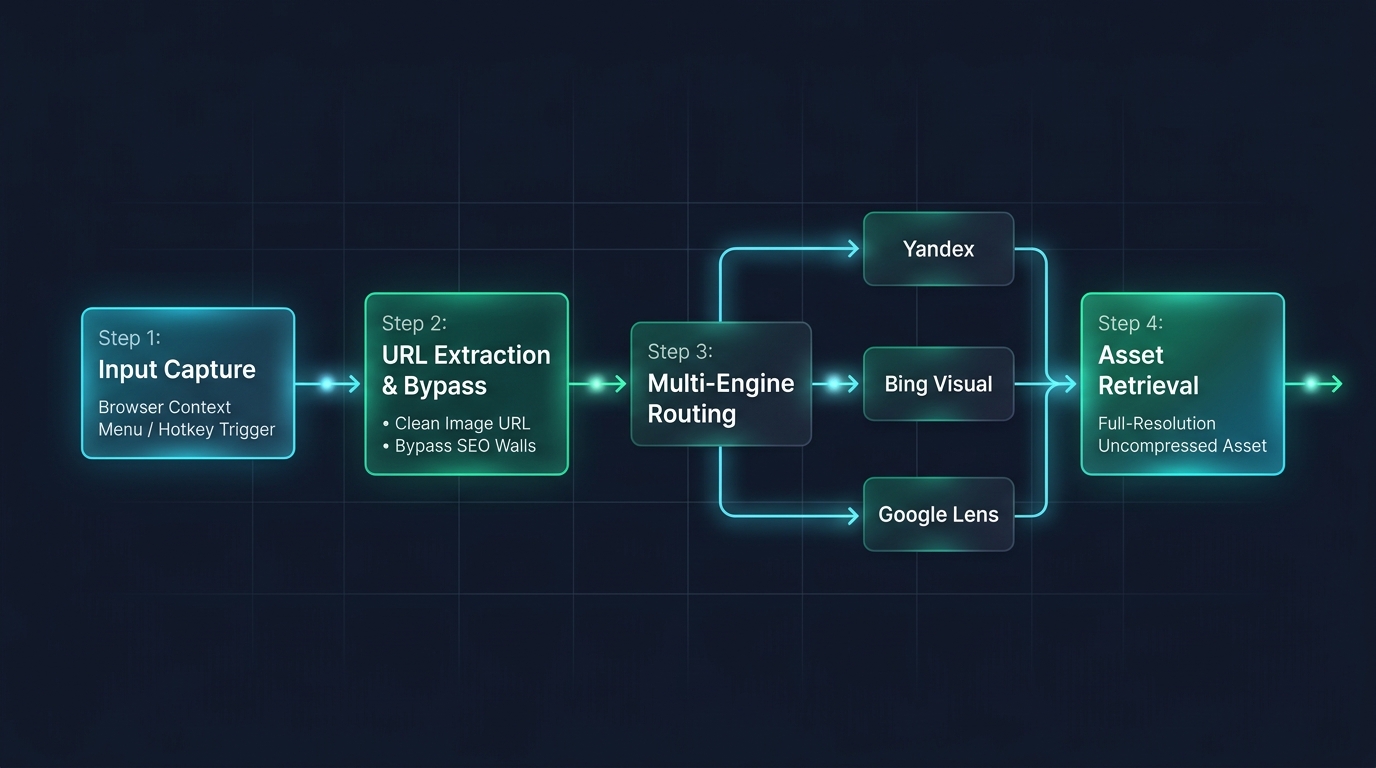
flowchart LR
    A["📸 Image Source
Browser Context / Flow Launcher"] --> B["⚡ Direct URL Extraction
Bypass Aggregators & Paywalls"]
    B --> C["🔍 Multi-Engine Query
Yandex Visual & Google Lens"]
    C --> D["🎯 Full-Res Master Asset
Uncompressed Original Retrieved"]

    style A fill:#1e293b,stroke:#38bdf8,stroke-width:2px,color:#f8fafc
    style B fill:#1e293b,stroke:#a855f7,stroke-width:2px,color:#f8fafc
    style C fill:#1e293b,stroke:#f59e0b,stroke-width:2px,color:#f8fafc
    style D fill:#064e3b,stroke:#34d399,stroke-width:2px,color:#f8fafc
📋 Click to view / copy raw Mermaid source
flowchart LR
    A["Image Source (Browser Context / Flow Launcher)"] --> B["Direct URL Extraction (Bypass Aggregators & Paywalls)"]
    B --> C["Multi-Engine Query (Yandex Visual & Google Lens)"]
C --> D["Full-Res Master Asset (Uncompressed Original Retrieved)"]- Google Lens (Intent & Commercialization): Google Lens is optimized for semantic identification (e.g., “What brand of shoes is this?” or “What landmark is in the background?”). While brilliant for shopping and mobile translation, it deprioritizes byte-level perceptual hashing and often suppresses direct deep-links to uncompressed source images.
- Yandex Visual Search (Perceptual Hashing & Direct Crop Matching): Yandex’s computer vision engine relies heavily on structural feature geometry and direct uncompressed crawl indexes. Even when an image has been cropped, rotated, recolored, or stripped of metadata, Yandex indexes the largest identical visual clusters and displays direct links to original resolution files (e.g., 4000×3000 original PNGs) without forcing you to click into an aggregator.
- Bing Visual Search (Hybrid Enterprise Filter): Useful for document typography and OCR-assisted image search, but frequently throttles deep web crawls compared to specialized crawlers.
2. Browser Configuration: Custom Search Engines in Edge and Chrome
You do not need to install heavy, telemetry-laden browser extensions to get instant reverse image search. Both Chromium-based browsers (Microsoft Edge and Google Chrome) support custom search engine shortcuts with direct URL parameter substitution:
- Open Browser Settings and navigate to Search engine > Manage search engines and site search.
- Under Site search, click Add.
- Configure the entry:
- Search engine: Yandex Reverse Visual Search
- Shortcut:
yimg - URL with %s in place of query:
https://yandex.com/images/search?rpt=imageview&url=%s
Now, whenever you right-click any web image and select “Copy image address”, you can simply jump to your address bar, type yimg [Space], paste the URL, and press Enter. The browser bypasses the landing page and jumps straight to the full-resolution match grid.
3. Desktop Hotkey Search with Flow Launcher
If you already use productivity launchers like Flow Launcher on Windows 11 (which we highlighted alongside our setup for PowerToys Mouse Without Borders over Bluetooth PAN), you can turn image lookup into a system-wide keystroke.
Below is a lightweight Python script that registers a Flow Launcher URL trigger. When you press Alt + Space and type img <URL>, it immediately fires the query in your default browser:
# Flow Launcher Reverse Image Search Custom Query Plugin
# Save as: %APPDATA%\FlowLauncher\Settings\Plugins\QuickImageSearch\main.py
import sys
import webbrowser
import urllib.parse

def search_image(image_url: str, engine: str = "yandex"):
    encoded = urllib.parse.quote_plus(image_url.strip())

    engines = {
        "yandex": f"https://yandex.com/images/search?rpt=imageview&url={encoded}",
        "lens": f"https://lens.google.com/uploadbyurl?url={encoded}",
        "bing": f"https://www.bing.com/images/search?view=detailv2&iss=sbi&FORM=SBIHMP&sbisrc=UrlPaste&q=imgurl:{encoded}"
    }

    target_url = engines.get(engine.lower(), engines["yandex"])
    webbrowser.open(target_url)

if __name__ == "__main__":
    if len(sys.argv) > 1:
        query_url = sys.argv[1]
        search_image(query_url, engine="yandex")
For tab-heavy research workflows, this combines seamlessly with our automated method for bulk exporting URLs from Microsoft Edge tabs, allowing you to ingest and audit dozens of creative references in a single batch.
4. Privacy & Operational Security Guardrails
While public visual search engines are invaluable for asset recovery, they must be used with strict information governance:
- Never Upload Internal Blueprints: Do not feed unreleased proprietary system diagrams, client network topologies, or internal dashboards into third-party visual engines. Public engines crawl and index query payloads for future training sets.
- Strip EXIF Metadata on Sensitive Assets: If searching an image from an internal camera or smartphone, strip GPS geolocation and camera serial numbers before executing reverse queries.
- Sanitize Local Intranet URLs: Visual search engines cannot resolve
http://192.168.1.x/asset.pngor private SharePoint links. If searching an internal image, upload it to an isolated temporary scratch host or inspect its cryptographic hash locally.
Executive Takeaways
- Bypass Aggregation Bloat: Specialized computer-vision endpoints like Yandex Visual Search locate raw master assets and exact resolution matches without the watermark paywalls common on mainstream platforms.
- Zero Extension Overhead: Native Chromium search engine shortcuts and Flow Launcher triggers provide sub-2-second visual queries without injecting third-party browser plugins.
- Rigorous Privacy Discipline: Restrict public reverse image lookups strictly to published creative assets; never submit internal architectural schematics or confidential operational screenshots.