
 by
My WordPress blog had been around for years. It had moved from GoDaddy to my own infrastructure, accumulated plugins and backup folders, and continued doing its job: serving articles.
Then WordPress displayed a warning that was difficult to ignore. The site was running PHP 7.4.33, an outdated runtime that no longer received security updates.
I had tried changing PHP before, and the site broke. This time, I wanted to understand the dependencies, preserve a recovery path, and verify the outcome before putting the updated site in front of readers.
I used AI agents to investigate the environment and execute the technical work. I remained responsible for approvals, backup preparation, visual acceptance and the public routing change.
The result was a clean replacement WordPress container. The more useful lesson was how the process changed when the agents found something that made the original upgrade plan unsuitable.
The original request was an upgrade
The starting point was an older TurnKey WordPress container running Debian 11, PHP 7.4 and MariaDB 10.5. My first question was straightforward: should we upgrade WordPress first, or PHP?
That question turned out to be too narrow. WordPress depends on its theme, plugins, PHP extensions, database, web server and external integrations. Updating one component does not establish that the entire site will still work.
I asked the agent to inspect the installation before changing it. We established recovery coverage with snapshots and a Proxmox Backup Server backup. I completed the PBS backup myself.
This gave us somewhere to return if the migration failed. It did not prove that the old installation was clean.
Inspection changed the plan
The investigation found unexpected executable files and administrator accounts that could not be dismissed as old migration leftovers. Some artifacts matched malicious execution and account-creation patterns.
It was important to separate that evidence from speculation. An unfamiliar folder is not automatically malware, and a suspicious request in an access log does not prove that an attacker successfully executed code.
The findings were nevertheless strong enough to stop the planned in-place upgrade. The old container was isolated, evidence was preserved, and we changed direction: build a fresh environment and migrate reviewed application data.
This was the first major lesson for me. A useful AI agent must be able to challenge the task it was originally given when the evidence changes.
A backup preserves a state, including its problems
We kept both the pre-upgrade recovery point and incident evidence. The distinction matters: restoring an earlier snapshot would restore the old system, potentially including unwanted files already present at that time.
The old container therefore became a preserved source and recovery reference, not a template to clone blindly into production.
The replacement used a fresh operating-system template, fresh WordPress core, and fresh copies of the active theme and plugins from their official distribution sources. Reviewed media and the database were migrated separately.
Unauthorized administrator accounts were excluded from the replacement. Sessions and application passwords were revoked there, and fresh credentials and WordPress salts were generated.
This did not establish the original entry point or prove that every historical security question had been answered. It reduced the risk of bringing the identified problems into the new environment.
Keeping the blog familiar on a new foundation
The replacement was built on Debian 13 with PHP 8.4, MariaDB 11.8 and a freshly installed WordPress release. The exact installed versions should be checked against the deployment record before publication; version numbers are evidence of this migration, not a permanent recommendation for other sites.
The objective was to preserve the blog’s identity: posts, comments, media, menus, widgets, theme settings and familiar URLs.
The validation recorded:
| Check | Result recorded during migration |
|---|---|
| Original WordPress content records | All 680 compared successfully after URL normalization |
| Comments | All 333 compared successfully |
| Reviewed media files | 2,681 copied with hash verification |
| Selected layout and configuration values | 17 compared successfully |
| Active theme and plugin files | Compared with fresh official packages |
The 680 records were not 680 published articles. WordPress also stores revisions, attachments, pages and other content types in its posts table.
Likewise, comparing selected settings is not a guarantee that every integration works. External services require their own tests and, where appropriate, fresh authentication.
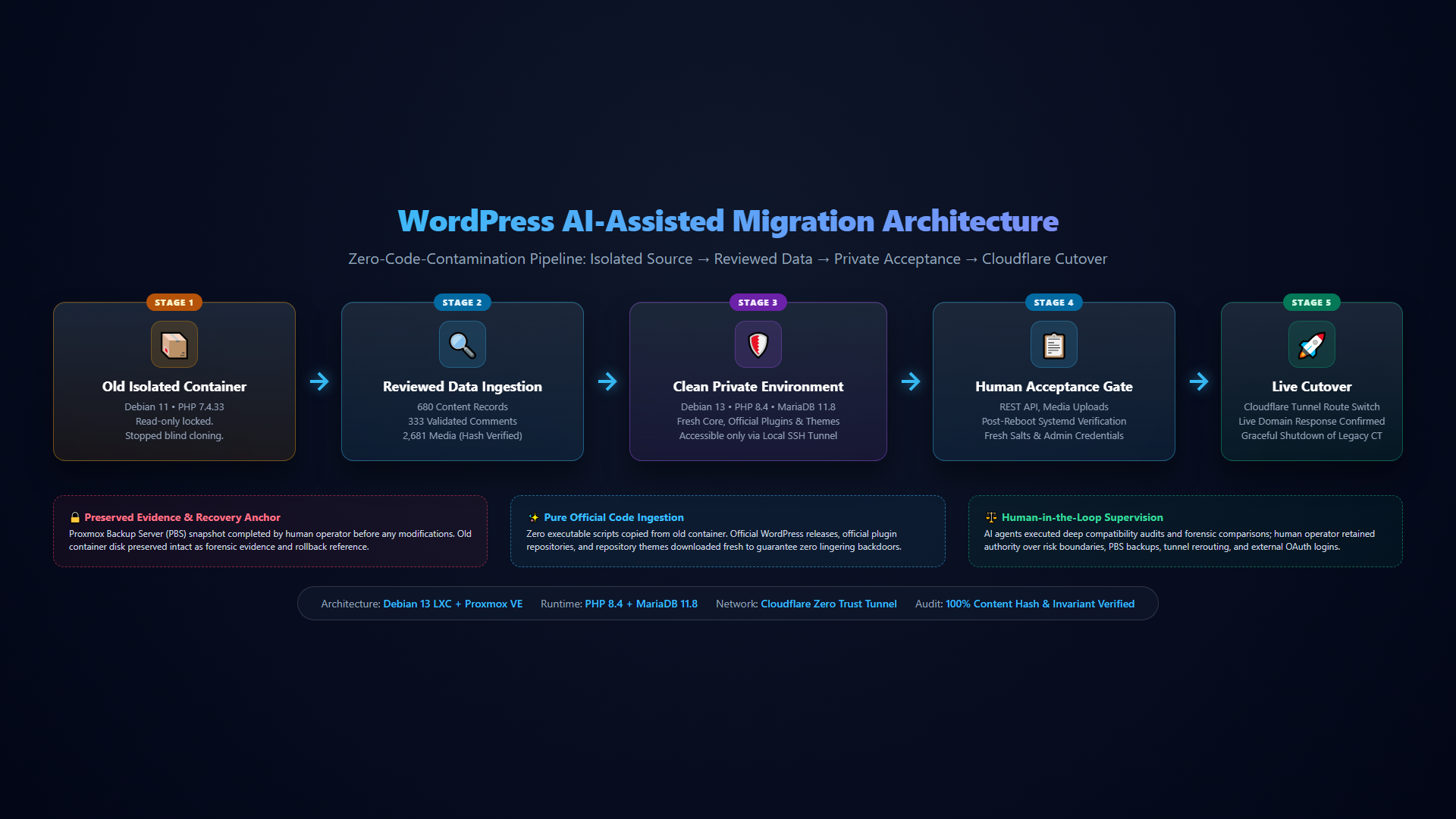
flowchart LR
    A["Old isolated container
PHP 7.4 • Debian 11"] --> B["Reviewed database and media
680 records • 2,681 files"]
    A --> C["Preserved evidence & recovery points
Forensic snapshot & PBS backup"]
    D["Fresh OS & official app code
Debian 13 • PHP 8.4 • Official Core"] --> E["Private replacement container
SSH Tunnel Preview Only"]
    B --> E
    E --> F["Functional tests & human acceptance
REST API • Post-Reboot Systemd"]
    F --> G["Cloudflare Tunnel cutover
Zero public IP exposure"]
    G --> H["Live blog & follow-up checks
Public HTTPS 200 verified"]

    style A fill:#1e293b,stroke:#f59e0b,stroke-width:2px,color:#f8fafc
    style B fill:#1e293b,stroke:#38bdf8,stroke-width:2px,color:#f8fafc
    style C fill:#450a0a,stroke:#ef4444,stroke-width:2px,color:#f8fafc
    style D fill:#1e293b,stroke:#a855f7,stroke-width:2px,color:#f8fafc
    style E fill:#1e293b,stroke:#6366f1,stroke-width:2px,color:#f8fafc
    style F fill:#1e293b,stroke:#3b82f6,stroke-width:2px,color:#f8fafc
    style G fill:#064e3b,stroke:#10b981,stroke-width:2px,color:#f8fafc
    style H fill:#064e3b,stroke:#34d399,stroke-width:2px,color:#f8fafc
📋 Click to view / copy raw Mermaid source
flowchart LR
    A[Old isolated container] --> B[Reviewed database and media]
    A --> C[Preserved evidence and recovery points]
    D[Fresh OS and official application code] --> E[Private replacement]
    B --> E
    E --> F[Tests and human acceptance]
    F --> G[Cloudflare Tunnel cutover]
    G --> H[Live blog and follow-up checks]
Testing privately before changing public traffic
The new container initially ran as a private preview, accessible through a local SSH tunnel. Scheduled publishing, mail and external server requests were restricted while we inspected it.
This avoided accidental notifications or scheduled activity from a second copy of the site.
The checks went beyond opening the homepage:
- Sign in to WordPress and open the editor.
- Create and delete a temporary draft through the REST API.
- Import and remove a test media item using the web-server account.
- Check database integrity.
- Inspect representative pages and images in the browser.
- Verify that sensitive configuration and backup files were not downloadable.
- Verify that executable files could not run from the uploads directory.
- Restart the container and repeat service checks.
The restart check found a real problem. Services that worked during setup failed after boot because Debian’s service manager encountered a container compatibility restriction. The agent traced the failures to the host’s container security logs, applied the Proxmox configuration adjustment, and repeated the checks.
The container remained unprivileged. The adjustment had a capability tradeoff, which was made explicit rather than hidden behind a successful homepage test.
If we had stopped at “the page loads,” we would have missed it.
What I delegated—and what I kept
| AI agents handled | I handled |
|---|---|
| Inventory and compatibility investigation | Decisions about scope and acceptable risk |
| Evidence collection and technical review | Completing the PBS backup |
| Building the replacement and migrating reviewed data | Approving the replacement approach |
| Configuration, comparisons and functional tests | Reviewing the private site |
| Diagnosing failures and documenting results | Updating the Cloudflare route and completing external sign-ins |
Separate agent reviews helped inspect the security boundary and look for regressions. They did not replace testing, and agreement between agents was not treated as proof.
“AI-executed, human-supervised” is the accurate description. I did not have to type every command, but I still owned the decisions.
Moving traffic and checking the result
After I reviewed the preview, the site was configured for its public HTTPS domain. I updated the Cloudflare Tunnel route to the new internal origin.
The agents checked the public homepage, login page and REST API and confirmed that responses came from the replacement container. Only then was the old container gracefully stopped and its automatic startup disabled.
Its disk, snapshots and evidence were retained. A later snapshot captured the new live configuration with descriptive comments, followed by another restart and public-site check.
There is an important rollback limitation here: once new comments, edits or posts arrive on the replacement, restoring an older state can lose those changes. A recovery point is useful only when you understand what it contains and what happened after it was taken.
The problems that appeared after launch
The migration was working, but the follow-up work was real.
Site Kit initially could not reach Google’s authentication service because of the outbound restrictions left from recovery. The agent adjusted the permitted destinations and network rules, verified connectivity, and left the Google sign-in and consent flow to me.
Cloudflare logs then showed requests still going to the old internal origin. A wildcard route had not been updated alongside the main hostname. Correcting that route resolved the routing mismatch.
Search Console added another lesson: old crawl reports are not a live health check. Some reported errors predated the migration by weeks or months. We checked representative URLs rather than assuming the replacement had caused every reported problem.
That review also exposed duplicate-host indexing and missing-page redirects to unrelated articles. Those were separate SEO decisions, not proof that the migration had failed.
At the point this draft was prepared, email delivery, recurring backup coverage and parts of the SEO cleanup still required follow-up. They should not be described as completed without fresh verification.
A practical checklist for an AI-assisted migration
For anyone trying a similar workflow, this is the checklist I would start with:
- Inventory first. Identify the actual software versions, active components, storage and integrations.
- Define recovery. Know which snapshot or backup can restore which state. Verify restore procedures where practical.
- Set approval boundaries. Separate inspection, preparation, migration and public cutover.
- Change the plan when evidence requires it. An upgrade and a recovery rebuild are different tasks.
- Preserve data deliberately. Compare records, media and settings; do not copy every unknown executable.
- Test privately. Include authentication, writes, APIs, media and a full restart.
- Switch traffic only after acceptance. Confirm the public domain reaches the intended origin.
- Keep a post-launch list. Mail, scheduled jobs, credentials, backups and search indexing all need explicit checks.
For a generic Debian-based WordPress environment, these are examples of read-only checks—not a universal upgrade script:
# Inspect the runtime and database versions.
php -v
mariadb --version

# Inspect service failures after a reboot.
systemctl --failed

# Run from the WordPress directory with an appropriately privileged account.
wp core version
wp plugin list
wp theme list
wp db check

# Check the public response. Substitute your own domain.
curl -I https://example.com/
Checksums can establish that files match a known package; they do not prove that the package itself has no vulnerabilities. HTTP 200 establishes a successful response, not that all content and integrations are correct.
What changed for me
AI agents made it practical to carry out a migration I had been reluctant to attempt again. Much like using local OCR pipelines for messy document reassembly or applying AIDRAD principles to compress software lifecycles, agents could investigate, execute, compare and diagnose across several layers of the system while keeping the work visible.
The most valuable part was not the speed of typing commands. It was the ability to turn a vague request—“please upgrade my old blog”—into a sequence of decisions with evidence at each step.
That is how I want to use agents for infrastructure work: give them enough access to do useful work, require them to show what they verified, and retain human control over the moments that change the risk.