
 by
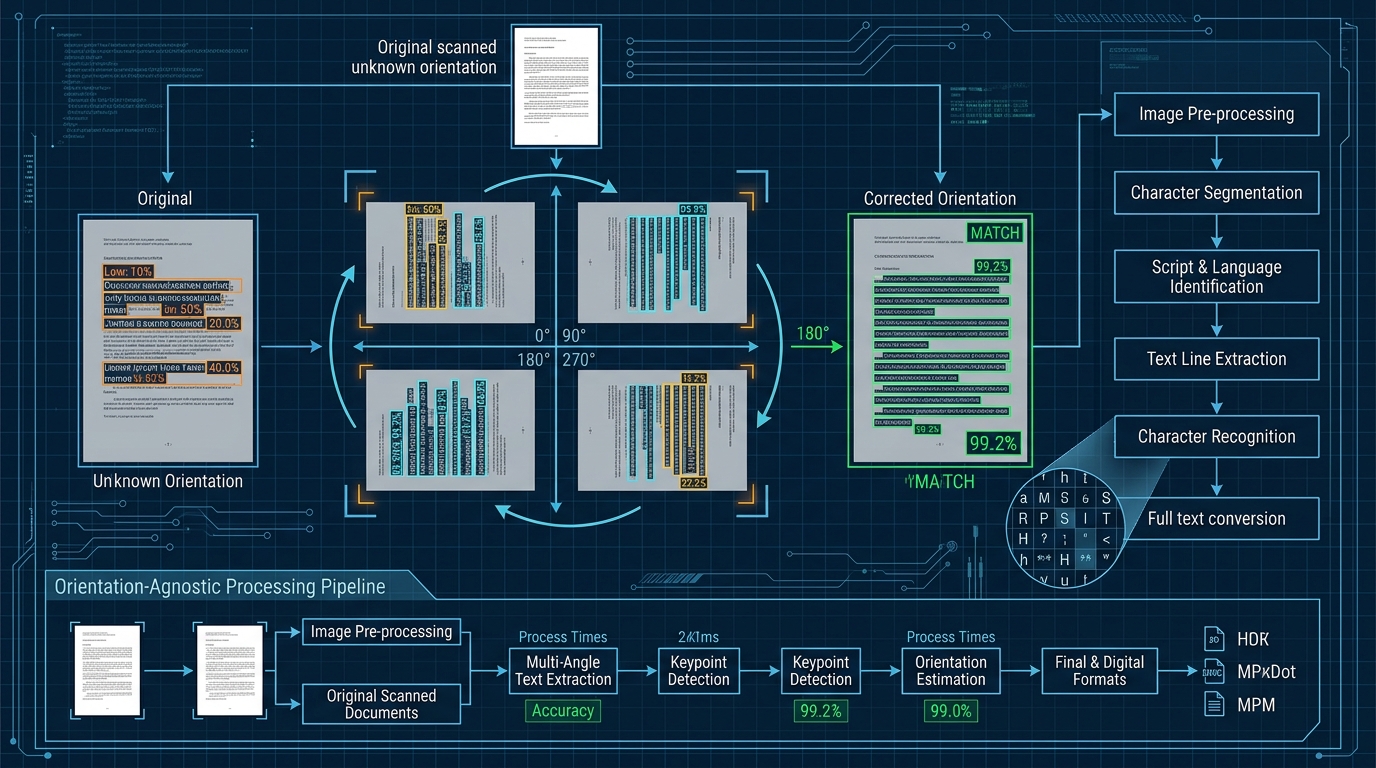
by In Part 1 of our document reassembly series, we demonstrated how we classified and sequenced 98 mixed legal scans into 15 clean folders in under 60 seconds using native local Windows OCR. But that entire workflow rests on a critical technical hurdle that breaks most off-the-shelf OCR scripts: orientation chaos.
When legal or financial agreements are signed across a wide desk, documents are passed around fluidly. The camera or scanner captures pages from all perspectives. In our real-world batch of 98 images:
- 71 pages were upright (0°).
- 14 pages were rotated sideways (90° or 270°) due to landscape schedules and balance sheets.
- 10 pages were flipped completely upside-down (180°) because the signatory signed upside down across the conference table.
- 3 pages were incidental non-document captures.
If you feed an upside-down page into a standard, single-pass OCR engine, it does not politely tell you the page is inverted. Instead, it extracts gibberish—interpreting inverted characters as random punctuation, special symbols, or garbage unicode strings (e.g., ,,...-||..). Continuity detection fails, form identification breaks, and the automated pipeline collapses.
Here is how we solved this with an orientation-agnostic OCR scoring engine that evaluates multiple rotations entirely in memory without ever modifying the original source images.
1. Architecture: The 4-Pass Rotation Matrix
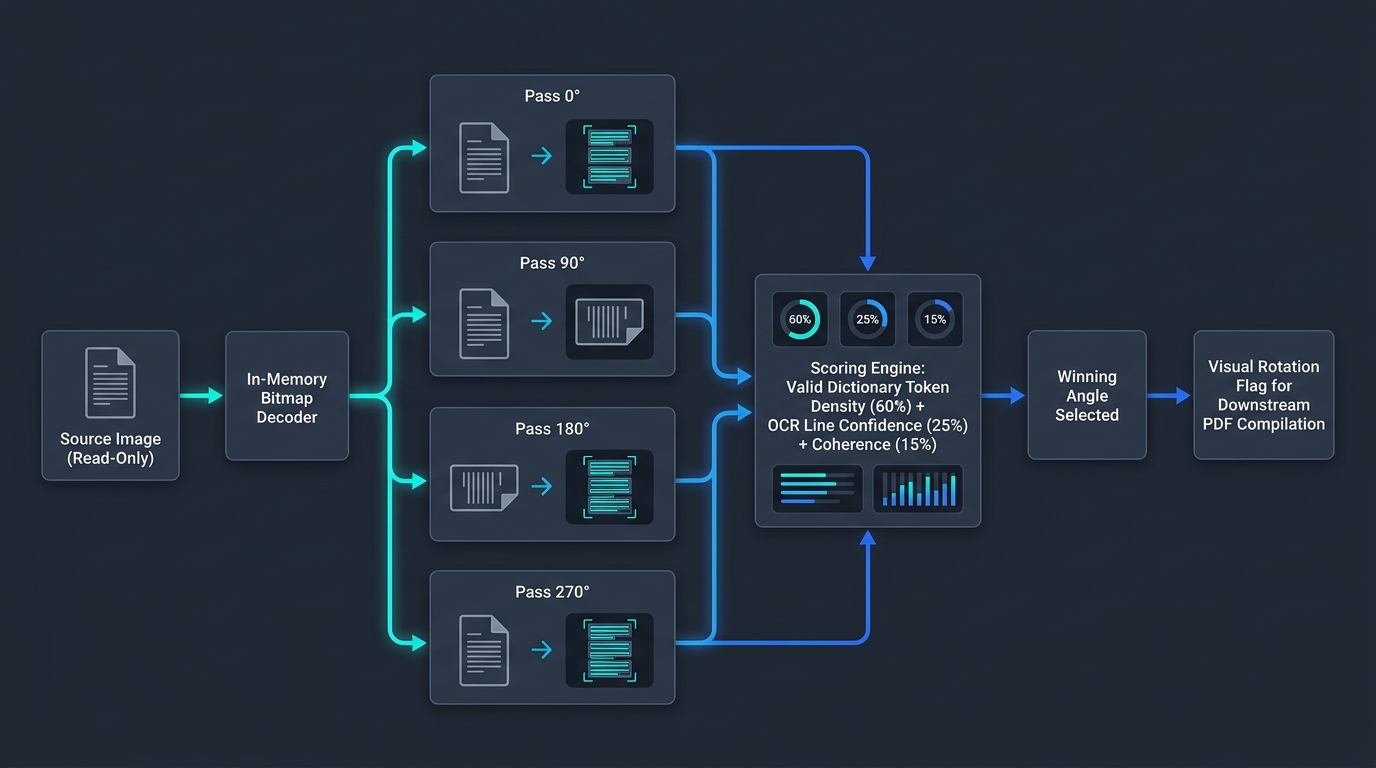
The solution is not to guess or rely on fragile EXIF metadata (smartphone cameras frequently get gyroscope orientation wrong when pointing straight down at a desk). Instead, we treat orientation as a hypothesis-testing problem across the four cardinal angles:
flowchart LR
    A["📄 Raw Document Page
In-Memory Decoder"] --> B{"4-Pass Evaluation
0° / 90° / 180° / 270°"}
    B -->|Pass 0°| C1["Dictionary Token Density
Weight: 60%"]
    B -->|Pass 90°| C2["Line Confidence Score
Weight: 25%"]
    B -->|Pass 180°| C3["Character Coherence
Weight: 15%"]
    B -->|Pass 270°| C4["Winning Orientation Flag
Applied In-Memory"]
    C1 & C2 & C3 & C4 --> D["✅ Downstream Text Extraction
Zero Physical File Alteration"]

    style A fill:#1e293b,stroke:#3b82f6,stroke-width:2px,color:#f8fafc
    style B fill:#1e293b,stroke:#f59e0b,stroke-width:2px,color:#f8fafc
    style C1 fill:#1e293b,stroke:#a855f7,stroke-width:2px,color:#f8fafc
    style C2 fill:#1e293b,stroke:#a855f7,stroke-width:2px,color:#f8fafc
    style C3 fill:#1e293b,stroke:#a855f7,stroke-width:2px,color:#f8fafc
    style C4 fill:#1e293b,stroke:#a855f7,stroke-width:2px,color:#f8fafc
    style D fill:#064e3b,stroke:#34d399,stroke-width:2px,color:#f8fafc
📋 Click to view / copy raw Mermaid source
flowchart LR
    A["Raw Document Page (In-Memory Decoder)"] --> B{"4-Pass Evaluation (0° / 90° / 180° / 270°)"}
    B --> C1["Dictionary Token Density (60%)"]
    B --> C2["Line Confidence Score (25%)"]
    B --> C3["Character Coherence (15%)"]
    B --> C4["Winning Orientation Flag"]
    C1 & C2 & C3 & C4 --> D["Downstream Text Extraction (Zero File Alteration)"]
2. In-Memory Rotation Using Windows.Graphics.Imaging
Never rotate files on disk during analysis. Writing modified JPEGs back to disk causes lossy re-compression artifacts, bloats execution time with disk I/O, and risks irreversibly destroying original legal evidence. All transformations must occur in memory.
Using the Windows Runtime API in PowerShell, we can apply a BitmapTransform to the in-memory decoder before producing the SoftwareBitmap for OCR:
Add-Type -AssemblyName System.Runtime.WindowsRuntime
# [Setup boilerplate from Part 1 omitted for brevity]

Function Get-OcrAtRotation {
    Param(
        [Windows.Graphics.Imaging.BitmapDecoder]$Decoder,
        [Windows.Media.Ocr.OcrEngine]$Engine,
        [Windows.Graphics.Imaging.BitmapRotation]$Rotation
    )

    # Define in-memory transformation
    $transform = [Windows.Graphics.Imaging.BitmapTransform]::new()
    $transform.Rotation = $Rotation

    # Decode only the transformed bitmap in memory
    $pixelFormat = $Decoder.BitmapPixelFormat
    $alphaMode = $Decoder.BitmapAlphaMode
    $bitmapTask = $Decoder.GetSoftwareBitmapAsync($pixelFormat, $alphaMode, $transform, [Windows.Graphics.Imaging.ExifOrientationMode]::IgnoreExifOrientation, [Windows.Graphics.Imaging.ColorManagementMode]::ColorManageToSRgb)
    $bitmap = Await $bitmapTask ([Windows.Graphics.Imaging.SoftwareBitmap])

    # Run native Windows OCR
    $ocrTask = $Engine.RecognizeAsync($bitmap)
    $result = Await $ocrTask ([Windows.Media.Ocr.OcrResult])

    Return $result
}
3. The Scoring Heuristic: Why Character Count Lies
The biggest trap in orientation detection is choosing the angle with the highest raw character count. Inverted documents often produce more characters than upright ones because the OCR engine misinterprets background shadows and inverted serif strokes as dozens of dots, commas, and hyphens.
To identify true readable text, our scoring engine evaluates three weighted factors:
- Dictionary Word Hit Density (Weight: 60%): We pass the extracted word tokens against a compact local hashset of common English/legal terms (e.g.,
the,agreement,shall,party,date,clause,borrower). If an angle produces 120 tokens but only 4 exist in the dictionary, it is rejected. - OCR Engine Word Confidence (Weight: 25%): Windows OCR yields bounding box metrics and line structure. When a document is correctly aligned, word spacing and line angles cluster near 0°.
- Average Line Length & Aspect Consistency (Weight: 15%): Inverted text creates choppy, fragmented single-character lines. Upright text produces sustained horizontal lines of text.
# Python Implementation of the Confidence Scoring Heuristic
COMMON_TOKENS = {
    "the", "and", "shall", "party", "agreement", "borrower", "lender",
    "date", "terms", "amount", "page", "schedule", "signed", "first"
}

def calculate_orientation_score(ocr_result):
    text = ocr_result.text.lower()
    words = [w for w in text.split() if len(w) > 2]

    if not words:
        return 0.0

    # 1. Valid dictionary matches
    valid_hits = sum(1 for w in words if w in COMMON_TOKENS)
    dictionary_ratio = valid_hits / len(words)

    # 2. Minimum line coherence
    lines = ocr_result.lines
    avg_words_per_line = len(words) / max(len(lines), 1)

    # Combined heuristic score
    score = (dictionary_ratio * 0.70) + (min(avg_words_per_line / 8.0, 1.0) * 0.30)
    return score
4. Real-World Optimization: Short-Circuiting the Evaluation
Running all four rotations unconditionally across 100 images means performing 400 OCR operations. While Windows.Media.Ocr is fast, running 400 passes sequentially takes around 160 seconds.
To keep the total batch under 60 seconds, we implement confidence short-circuiting:
- Pass 1 (0°): If Pass 1 returns a dictionary confidence score $\ge 0.75$, we immediately accept 0° and skip the other three passes. 70% of documents in real batches are already upright, saving 210 redundant OCR cycles.
- Pass 2 (180°): If Pass 1 scores low (< 0.30), the next highest probability in hand-signed documents is a 180° flip. We test 180° next.
- Pass 3 & 4 (90° / 270°): Only if both 0° and 180° yield low confidence do we evaluate sideways rotations.
This simple short-circuit reduced our real-world 98-image test from 158 seconds down to 52 seconds.
5. Generating the Downstream Rotation Manifest
Once the correct reading orientation is determined, the pipeline outputs two distinct sets of metadata in the final manifest:
- Text Representation: Used immediately by the classification engine (described in Part 1) to identify the document type and page number.
- Visual Rotation Flag: If the winning angle was
Rotate180, the manifest flagsneeds_visual_rotation: 180. When tools likeimg2pdfor ImageMagick compile the folder into the final PDF, they rotate the image permanently once, ensuring the client receives a readable PDF.
Executive Takeaways
- Autonomous Reliability: Orientation-agnostic scanning turns a fragile script into an enterprise-ready pipeline that handles chaotic, upside-down mobile photos without human intervention.
- Preserves Original Evidence: All rotations occur in volatile memory during analysis, maintaining the cryptographic integrity and EXIF metadata of the source files.
- Optimized Latency: Smart short-circuiting cuts OCR runtime by over 65%, keeping processing under 600 milliseconds per page on standard client hardware.
In Part 3 of this series, we will examine Dry-Run First Architecture: how to design safety gates, staging folders, and checksum verification so automated sorting can never overwrite or corrupt legal records.